> For the complete documentation index, see [llms.txt](https://help.stockeo.solvenium.com/llms.txt). Markdown versions of documentation pages are available by appending `.md` to page URLs; this page is available as [Markdown](https://help.stockeo.solvenium.com/custom-liquid-filters.md).
# Custom Liquid filters
Filters are simple methods that modify the output of numbers, strings, variables, and objects. They are placed within an output tag `{{ }}` and are denoted by a pipe character `|`. In addition to the standard filters, Stockeo also provides custom filters.
#### base64\_encode
Encodes the provided input into [Base64 format](https://developer.mozilla.org/en-US/docs/Glossary/Base64). If the input is binary data, it is directly converted into a Base64 string; otherwise, the input is first converted into a UTF-8 byte representation before encoding.
{% tabs %}
{% tab title="Input" %}
```liquid
{{ "Hello World!" | base64_encode }}
```
{% endtab %}
{% tab title="Output" %}
```
SGVsbG8gV29ybGQh
```
{% endtab %}
{% endtabs %}
#### base64\_decode
Decodes a Base64-encoded string back into its original form. The decoded binary data is then interpreted as UTF-8 text and returned as a readable string.
{% tabs %}
{% tab title="Input" %}
```liquid
{{ "SGVsbG8gV29ybGQh" | base64_decode }}
```
{% endtab %}
{% tab title="Output" %}
```
Hello World!
```
{% endtab %}
{% endtabs %}
#### ensure\_array
Ensures that the value is always returned as an array. If the input value is `null` or `undefined`, an empty array is returned. If the value is already an array, it is returned unchanged. Otherwise, the value is wrapped in a single-element array.
Assume that the node `attributes` may contain either one or more child nodes.
When parsing a node with a single child node, the result is a single object:
{% tabs %}
{% tab title="XML" %}
```xml
ColorBlack
```
{% endtab %}
{% tab title="Parsing result" %}
```json
{
"attribute": {
"name": "Color",
"value": "Black"
}
}
```
{% endtab %}
{% endtabs %}
When parsing a node with multiple child nodes, the result is an array of objects:
{% tabs %}
{% tab title="XML" %}
```xml
Switch TypeBlueLayoutUSBacklightRGB
```
{% endtab %}
{% tab title="Parsing result" %}
```json
{
"attribute": [
{
"name": "Switch Type",
"value": "Blue"
},
{
"name": "Layout",
"value": "US"
},
{
"name": "Backlight",
"value": "RGB"
}
]
}
```
{% endtab %}
{% endtabs %}
The `ensure_array` filter removes this ambiguity by ensuring a consistent array structure, making the Liquid formulas shorter and easier to maintain.
#### gzip
Compresses the provided input using the GZIP compression algorithm with a high compression level. It outputs the result as compressed binary data, which can optionally be encoded in Base64 using the [base64\_encode](#json_parse-parse_json) custom Liquid filter.
#### json\_parse, parse\_json
Allows parsing string in a format compliant with JSON file requirements into an object. It enables access to individual fields within the object using dot or bracket notation.
**Usage example:**\
\
Assume that individual product nodes don't contain category names, but only a `category_id`.
```xml
101Electronics102Clothing103Home and GardenWireless HeadphonesELEC-001101Sports T-ShirtSPORT-002103
```
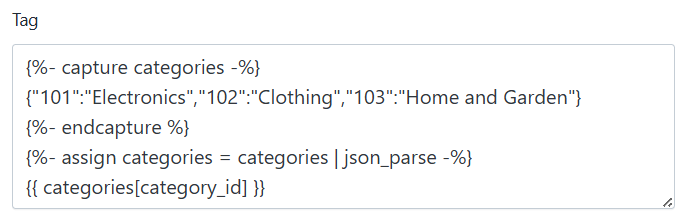
If you want to add categories as tags, you can create a formula that creates an object with key-value pairs, so-called dictionary variable. In this case, keys are categories ids, and values - their names. With the formula below, the category name will be found by its ID:
{% tabs %}
{% tab title="Liquid code" %}
```liquid
{%- capture categories -%}
{"101":"Electronics","102":"Clothing","103":"Home and Garden"}
{%- endcapture %}
{%- assign categories = categories | json_parse -%}
{{ categories[category_id] }}
```
{% endtab %}
{% tab title="Stockeo settings" %}
Example settings using the json_parse filter in Stockeo
{% endtab %}
{% endtabs %}
#### moment
Returns a current or specified time converted to a desired time zone.
The filter has two parameters: a date format and a [time zone identifier](https://en.wikipedia.org/wiki/List_of_tz_database_time_zones#List).
{% tabs %}
{% tab title="Input" %}
```liquid
stock_{{ "now" | moment: "YYYY-MM-DD", "America/Chicago" }}.csv
```
{% endtab %}
{% tab title="Output" %}
```
stock_2026-06-02.csv
```
{% endtab %}
{% endtabs %}
| format | description | example value |
| ------ | ------------------------------------------------------ | ------------- |
| DD | Two-digit day of the month (with leading zeros) | `01` to `31` |
| MM | Two-digit representation of the month | `01` to `12` |
| YY | Two-digit representation of the year | `26` |
| YYYY | Four-digit representation for the year | `2026` |
| HH | Two-digit representation of the hour in 24-hour format | `00` to `23` |
| hh | Two-digit representation of the hour in 12-hour format | `01` to `12` |
| A | Upper-case 'AM' or 'PM' based on the given time | `AM` or `PM` |
| a | Lower-case 'am' or 'pm' based on the given time | `am` or `pm` |
| mm | Two-digit representation of the minute | `00` to `59` |
| ss | Two-digit representation of the second | `00` to `59` |
This filter can be used, for example, in the **File Path** field of an FTP channel to match files whose names contain date or time information, allowing the automation to process only feeds generated on the current day or during the current hour.
#### to\_fixed
Rounds the number to keep only the given number of decimals.
{% tabs %}
{% tab title="Input" %}
```liquid
{{ 1.2345 | to_fixed: 2 }}
```
{% endtab %}
{% tab title="Output" %}
```
1.23
```
{% endtab %}
{% endtabs %}
The difference between `round` and `to_fixed` it that `round` returns a number so it trims trailing zeros while `to_fixed` will preserve them.
#### xml\_unescape
Unescaping characters that are treated as special in XML documents:
| | |
| ------------------ | -------- |
| **Escaped String** | **Char** |
| \< | < |
| \> | > |
| \" | " |
| \' | ' |
| \& | & |
This is useful when special characters from HTML in the product description coming from the feed are escaped, causing the HTML syntax to be incorrectly interpreted by Shopify.
{% tabs %}
{% tab title="Input" %}
```html
<p>Exceptional coffee with vanilla & chocolate flavor.</p>
<ul>
<li>100% Arabica</li>
<li>Freshly roasted</li>
</ul>
```
{% endtab %}
{% tab title="Output" %}
```html
Exceptional coffee with vanilla & chocolate flavor.
100% Arabica
Freshly roasted
```
{% endtab %}
{% endtabs %}
#### xml\_escape
It works in the opposite way to the `xml_unescape` filter. It replaces characters that are considered special in XML documents.
| | |
| -------- | ----------------- |
| **Char** | **Escape String** |
| < | \< |
| > | \> |
| " | \" |
| ' | \' |
| & | \& |